Plan Your Wedding Together, as a Family
Invite parents, siblings and your partner to one shared wedding board for tasks, vendor votes, comments, group chat and live updates — while private tools like your budget stay outside the family board.
This page shows an example. Create a free account to edit and save your own.
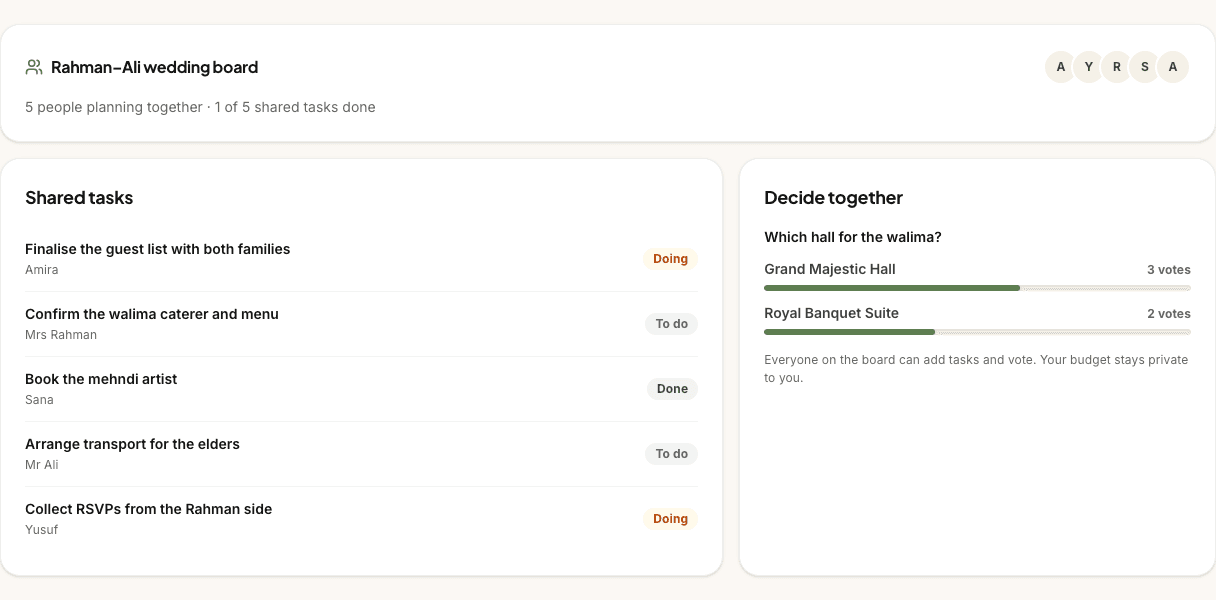
Rahman–Ali wedding board
5 people planning together · 1 of 5 shared tasks done
Shared tasks
- Doing
Finalise the guest list with both families
Amira
- To do
Confirm the walima caterer and menu
Mrs Rahman
- Done
Book the mehndi artist
Sana
- To do
Arrange transport for the elders
Mr Ali
- Doing
Collect RSVPs from the Rahman side
Yusuf
Decide together
Which hall for the walima?
- Grand Majestic Hall3 votes
- Royal Banquet Suite2 votes
Everyone on the board can add tasks and vote. Your budget stays private to you.
What the family board does
The family collaboration board gives your planning group one shared place to coordinate the jobs and decisions around the wedding. Couples can invite a partner, parents, siblings, close friends or a wedding planner by email, then everyone joins through a secure `/family/join/:token` link after creating or signing in to a free account.
Inside the board, the group sees shared members, tasks, vendor shortlist votes, recent activity and group chat. Only the owner manages invitations and access. Editors can edit board tasks; contributors can complete their assigned board tasks and vote; viewers can follow the board without changing it.
The board is built around the parts of planning that benefit from family input: who is chasing the caterer quote, which venue the family prefers, what has changed since yesterday, and who needs to be kept in the loop. It does not expose the couple’s private budget planner.
Who it’s for
Couples planning a Muslim wedding with family help, whether that means both sets of parents, a hands-on sibling, a partner helping with selected tools, or a trusted wedding planner coordinating tasks.
It works for small weddings too. A nikah with close family may only need a few shared jobs and one or two vendor votes; a multi-event wedding can use the same board to keep more people aligned without every decision disappearing into separate family chats.
Built for Muslim weddings
Muslim weddings are often family projects. Parents may be helping with guest lists, siblings may be comparing venues, and relatives may have strong views about catering, seating, transport or timings. The family board gives that input a proper place so the couple can involve people without handing over every private detail.
Muslim weddings are family projects
A nikah and walima can involve two families, several event days and a lot of informal delegation. One person might be checking imam availability, another collecting addresses, another reviewing decor quotes and another chasing a venue coordinator. The board turns those loose promises into visible tasks, assignees and statuses, so everyone can see what is pending, in progress or done.
That shared view is especially helpful when decisions involve family expectations rather than pure logistics. Instead of asking for opinions across several WhatsApp threads, shortlisted vendors can be put to a simple vote and discussed in the shared space.
Who sees what
The board has access levels. Owners and partners can invite people and manage the group. View-only members can see the shared board without changing it. Collaborators can vote and complete tasks. Editors can add, delete and reorder tasks too. That keeps family involvement useful without giving every helper the same level of control.
The family board shows shared shortlist vendors, task activity, votes, comments and messages for that group. It does not share the couple’s Budget Planner, Payment Tracker or private account settings. If you need to discuss a cost with family, you can choose what to say in chat or a task, but the private budget tool itself stays outside the collaboration board.
Decide together
When vendors are shortlisted, the family board can collect yes/no votes so favourites are easier to spot. The voting surface is deliberately simple: enough to understand the family’s preference without turning the decision into a complicated scoring sheet. The board also supports family comments on shortlisted vendors in the decision workspace, so people can explain why they prefer one option.
Tasks keep the follow-through attached to the decision. Once a caterer is the favourite, someone can be assigned to ask about halal certification, menu options, deposit deadlines or a tasting date, and the whole group can see when that job moves forward.
Inviting family
Owners and partners invite family by entering a name, email, role and access level. PlanMyNikah creates a join link under `/family/join/:token`; the invitee signs in or creates a free account, accepts the invite, and then lands on the shared board. The join page keeps the invite link visible so the email-confirmation round trip does not lose their place.
A family helper can be connected to more than one wedding board, and the board switcher keeps those weddings separate. Your own wedding board appears separately from any boards you have been invited to help with.
Everything you need to plan together
Invite family by link
Send parents, siblings, friends or a planner a secure join link tied to your wedding board.
Choose partner access
Choose each planning tool and its access level for your partner in Planning Circle. Board roles are separate; invitations and access stay with the owner.
Access levels
Choose view-only, collaborator or editor access for family members, with owners and partners managing the group.
Shared task board
Add, assign, complete, delete and reorder tasks so family jobs stay visible.
Vendor shortlist voting
Let family vote on shortlisted vendors and see which options have support.
Family comments and chat
Keep vendor feedback and group messages close to the planning board.
Live updates
Tasks and activity update in real time for connected members, with polling as a safety net.
Budget remains private
The board shares tasks, votes and messages, not your private Budget Planner or account settings.
Why couples use it
Family help is wonderful when everyone knows what they are helping with. The board makes delegation calmer because tasks have names, statuses and assignees. Instead of remembering who promised to call the venue, you can open the board and see the answer.
It also gives opinions a home. Parents and siblings can vote on shortlisted vendors or leave comments, while the couple keeps control of who is invited and what level of access each person has. That balance matters: Muslim wedding planning is collaborative, but it still needs boundaries.
How it works
- 1
Create your free account
Open the Family Collaboration tool from your couple dashboard and your board is created automatically.
- 2
Invite your planning group
Add your partner, parents, siblings or planner with the access level that matches how much they should do.
- 3
Assign, vote and update
Use shared tasks, shortlist votes, comments, chat and activity to keep the wedding plan moving together.
Family collaboration FAQs
Who can I invite?
You can invite your partner, parents, siblings, close friends, a wedding planner or another trusted helper. The invite form includes common roles and an Other option for custom relationships.
Do family members need accounts?
Yes. Family members use the `/family/join/:token` link to sign in or create a free account before joining the shared board. Guests do not need accounts for RSVPs, but family collaborators do because the board is a private planning space.
What can family see?
Family members see the shared board they are invited to: members, shared tasks, vendor shortlist votes, group messages and activity for that board. They do not get automatic access to your private budget, payment tracker, guest list or account settings through the family board.
Can we vote on options?
Yes. The board supports voting on shortlisted vendors, and the decision workspace can show family comments on shortlisted options. Votes are designed for simple family preference checks rather than formal procurement scoring.
Is my budget private?
The family board does not grant Budget access. You can separately share the live Budget through Planning Circle; private drafts and payment-derived totals remain excluded.
Can family members edit tasks?
It depends on their board role. Viewers can follow along, contributors can vote and complete their assigned board tasks, and editors can edit board tasks. Only the owner manages members. Planning-tool access is chosen separately in Planning Circle.
Keep planning
Related planning tools
- Wedding Checklist · Turn planning jobs into a clear list before assigning them to family.
- Budget Planner · Keep your private budget organised while collaborating on tasks separately.
- Guest List · Manage family guest counts and RSVP status in the dedicated guest tool.
Find your vendors
- Wedding planners · Find planners who can coordinate family-heavy weddings.
- Wedding venues · Compare venues before putting favourites to a family vote.
- Halal caterers · Review menu options and family preferences around halal catering.
Guides and help
- Couples FAQ · How PlanMyNikah works for couples, from planning tools to vendor enquiries.
- Planning guides · More guidance for planning your nikah, walima and family workflow.
Start your family board free
Free for couples. Your progress syncs across devices, and you can pick up where you left off any time.