Wedding Guest List Manager
Manage your Muslim wedding guest list, track RSVPs online, record dietary requirements, and assign tables for the nikah and walima — free, and exportable at any time.
This page shows an example. Create a free account to edit and save your own.
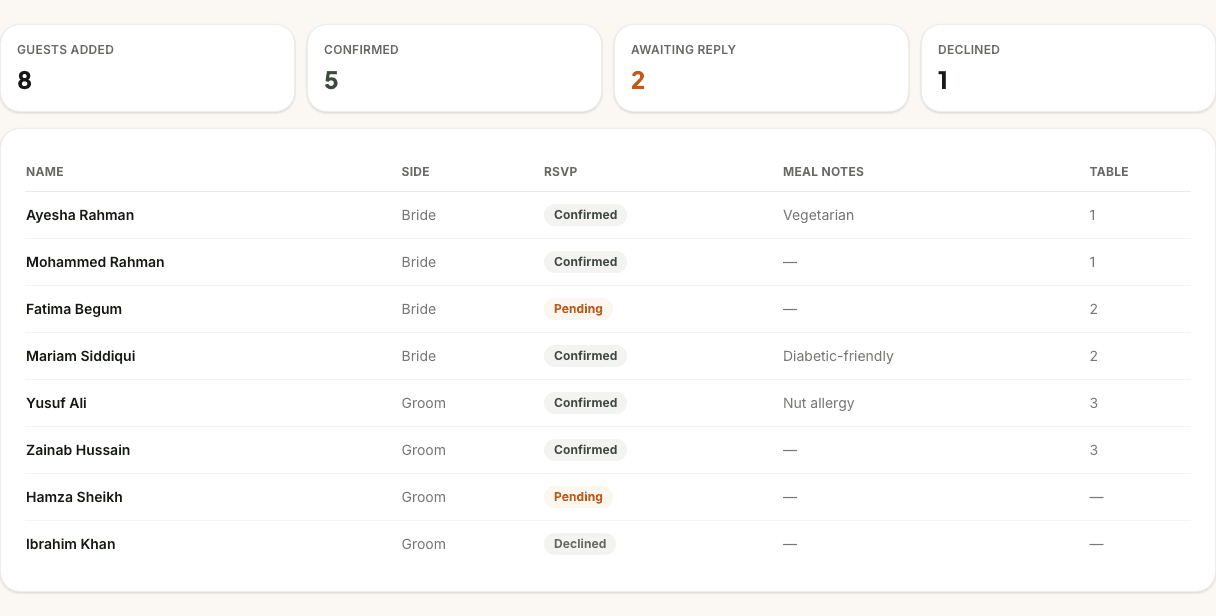
Guests added
8
Attending
5
Awaiting reply
2
Not attending
1
| Name | Side | RSVP | Meal notes | Table |
|---|---|---|---|---|
| Ayesha Rahman | Bride | Attending | Vegetarian | 1 |
| Mohammed Rahman | Bride | Attending | — | 1 |
| Fatima Begum | Bride | Awaiting reply | — | 2 |
| Mariam Siddiqui | Bride | Attending | Diabetic-friendly | 2 |
| Yusuf Ali | Groom | Attending | Nut allergy | 3 |
| Zainab Hussain | Groom | Attending | — | 3 |
| Hamza Sheikh | Groom | Awaiting reply | — | — |
| Ibrahim Khan | Groom | Not attending | — | — |
What the guest list manager does
The guest list manager acts as the single source of truth for your wedding count. Instead of juggling lists across separate notes apps, spreadsheets, and family WhatsApp groups, you can add guests, log their RSVP status, assign them to tables, and record their dietary needs in one place.
As you update guest records, the manager calculates live totals: the total number of guests added, how many have confirmed, how many replies you are still waiting for, and who has declined. This lets you track your headcount dynamically as the big day approaches.
It also integrates with our other planning tools: your guest count drives the cost-per-head calculations in the budget planner, and everyone attending an event appears in the seating plan ready to be given a table — no re-typing and no dragging.
Who it’s for
Couples planning a nikah, walima, or multi-event wedding who want to coordinate guest counts across both families without losing their sanity in the process.
It works whether you're hosting a small, intimate nikah ceremony at home or a grand walima in a banqueting hall for 500 people. You can manage everything under one list, split by family sides, so you always know who is coming.
Built for Muslim weddings
Generic wedding guest list templates assume single-event guest counts where everyone attends the same ceremony and reception. Muslim weddings are different: a nikah might have close family, the mehndi is for younger cousins and friends, and the walima brings together hundreds of guests from both sides. Our guest list manager is designed specifically for this multi-event reality.
Two families, one list
Muslim weddings are family projects. Usually, the bride's family and the groom's family manage their own invitations and RSVPs separately, which can lead to duplicate entries and mismatched counts. The guest list manager lets you record each guest's family side, keep people together in households, and invite each household to exactly the events they are coming to, so both families work from one list instead of two.
Dietary and halal notes your caterer will thank you for
Halal catering is the biggest line in any Muslim wedding budget, and caterers need precise details to plan. The guest list manager lets you record dietary requirements, allergies, and menu choices per guest. You can log who needs vegetarian meals, who has nut allergies, and who requires specific dietary accommodations, ensuring every guest is looked after and nothing is wasted on the day.
Export for the caterer and venue
When the final headcount is due, you shouldn't have to copy-paste names from a screen. Export your entire guest list, including RSVPs, side tags, dietary notes, and table numbers, as a clean CSV spreadsheet with a single click. Share it directly with your caterer, venue coordinator, and table decorators to keep everyone aligned and avoid last-minute billing surprises.
Everything you need to manage your guests
Tag by bride or groom side
Keep track of guest allocations and see how the list splits between both families.
Track RSVP status dynamically
Log guests as confirmed, pending or declined, with live totals calculated at the top.
Record dietary and meal notes
Note allergies, vegetarian preferences, and special dietary needs per guest.
Assign tables in one click
Assign table numbers to confirmed guests so your seating plan is always aligned.
Export to CSV anytime
Download your entire list as a spreadsheet ready to send to your caterer and venue.
Linked to other planning tools
Your guest count flows into the budget planner to calculate live per-head costs.
Synced across devices
Create a free account and access your guest list on your phone, tablet or laptop.
Free for couples
The guest list manager is completely free to use, with no hidden fees.
Why couples use it
Managing guest lists for South Asian and Muslim weddings is notoriously complex because the list is shared between parents, siblings, and the couple. Our manager gives you a single, shared view of the numbers, eliminating the "who invited who" confusion and ensuring you don't overbook the venue capacity.
It also makes the final weeks before the wedding much smoother. When the venue and caterer demand final numbers and dietary requirements, you don't have to spend hours messaging relatives — just export the CSV, email it over, and focus on the ceremony.
How it works
- 1
Try it with sample data
Explore the sample guest list on this page to see how sides, RSVPs and meal notes are tracked.
- 2
Add your guests and tag their details
Create your free account to save your own list, add guests, assign sides, and note dietary requirements.
- 3
Track RSVPs and export when ready
Update guest statuses as replies come in, assign tables, and export the list to CSV for your caterer.
Guest list FAQs
How many guests can I add?
Up to 2,000 people across up to 20 celebrations in one wedding plan, free of charge. We test the planner with a 600-guest, two-event wedding. If a change would take a plan past that size, it is not saved and your existing list stays exactly as it was.
Can I track both sides of the family?
Yes. You can record each guest's family side (bride's, groom's or both) and organise people into households, so both families can work from one shared list.
Can I record dietary requirements?
Yes. You can add specific meal notes and dietary requirements for each guest, such as vegetarian, gluten-free, or specific allergies. This is included in the CSV export so you can hand it straight to your caterer.
Can I export the list?
Yes. You can export a CSV for each event at any time. It lists every person with their household, their reply for that event, table and seating area, age group, dietary, allergy and access notes, meal and transport answers, and any contact details you added — ready to open in Excel or share with your caterer.
Can I keep separate nikah and walima lists?
Yes. In the full guest list manager inside your account, you can track guest attendance across different events like the Nikah and Walima, so you don't need to create separate lists for each event.
Keep planning
Related planning tools
- Seating Plan · Seat attending guests at tables, with mixed or segregated sections.
- Wedding Website · Share your date, venue, and schedule, and collect RSVPs online.
- RSVP Tracker · Track invitation replies and review open-form website submissions before adding people.
- Budget Planner · Set your total budget and split it across the nikah and walima.
Find your vendors
- Halal caterers · Per-head menus for the walima and every event before it.
- Wedding venues · Halls, hotels and marquees for nikah and walima celebrations.
- Invitations · Islamic wedding cards, digital invites and table stationery.
Guides and help
- Couples FAQ · How PlanMyNikah works for couples, answered plainly.
- Planning guides · Step-by-step guides to every free planning tool.
Start your free guest list
Free for couples. Your progress syncs across devices, and you can pick up where you left off any time.