Wedding RSVP Tracker
Personal invitation replies update the existing invitation in Guest List and Seating. Open-form website submissions and extra-guest requests need owner review before joining the plan.
This page shows an example. Create a free account to edit and save your own.
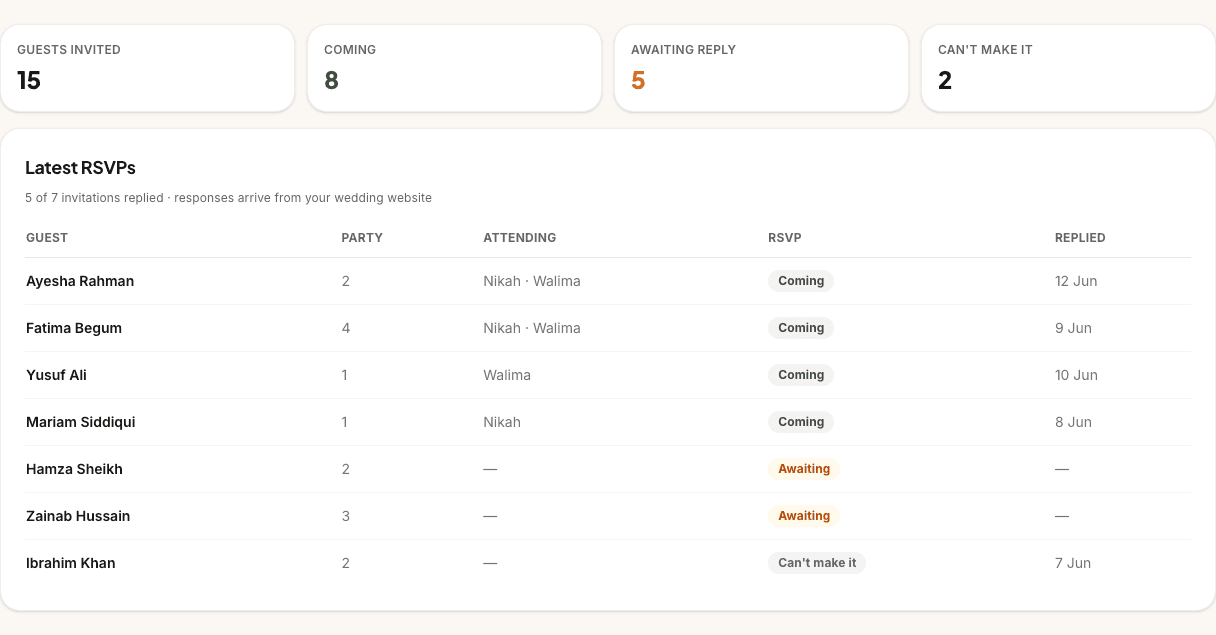
Guests invited
15
Coming
8
Awaiting reply
5
Can't make it
2
Latest RSVPs
5 of 7 invitations replied · responses arrive from your wedding website
| Guest | Party | Attending | RSVP | Replied |
|---|---|---|---|---|
| Ayesha Rahman | 2 | Nikah · Walima | Coming | 12 Jun |
| Fatima Begum | 4 | Nikah · Walima | Coming | 9 Jun |
| Yusuf Ali | 1 | Walima | Coming | 10 Jun |
| Mariam Siddiqui | 1 | Nikah | Coming | 8 Jun |
| Hamza Sheikh | 2 | — | Awaiting | — |
| Zainab Hussain | 3 | — | Awaiting | — |
| Ibrahim Khan | 2 | — | Can't make it | 7 Jun |
What the RSVP tracker does
Personal RSVP links let invited guests reply for their own people and events. Those replies update the existing invitation, including per-person dietary and allergy answers, in the connected Guest List and Seating journey.
The open form on your wedding website is a separate path. Its submissions appear in the Website inbox and need owner review before they join the guest plan. Requests for extra guests also require review.
Once a personal reply is saved, or an open-form submission is reviewed and added, Guest List and Seating use the same people and event replies for headcounts. Assigning a table remains a separate planning choice.
Who it’s for
Couples who want online wedding RSVP collection without sending guests to a separate app, spreadsheet or form builder. If your guests already have your wedding website link, the RSVP form sits in the same place as the schedule, venue notes and guest information.
It is especially useful for nikah and walima planning because one guest may attend one event but not another. Personal links show the events they are invited to, and replies remain specific to each event.
Built for Muslim weddings
Muslim weddings often have more than one guest-facing event, and the RSVP question is rarely just "yes or no". A close relative might attend the nikah and family meal, a friend might come only to the walima, and parents may need to know which side of the family a response belongs to before they finalise tables and catering.
How online RSVP works
Create your wedding website, publish it, and share the `/w/:slug` link with guests. The RSVP form can collect attendance, party names, selected events, meal choices, phone or WhatsApp details, guest side, transport needs and accessibility notes depending on the settings you switch on. Guests do not need a PlanMyNikah account; they simply reply from the invitation page.
Personal replies update the existing guest invitation. Open-form submissions appear in the Website inbox for owner review; adding a reviewed submission preserves its people, event choices and per-person requirements.
Chasing the stragglers
Late replies are part of wedding planning, especially when parents are collecting names through family networks. The tracker shows the difference between guests who have responded, guests who are still awaiting follow-up and responses that need review. You can export the current list or filter by status before asking a parent, sibling or coordinator to chase the remaining names.
The wedding website can also show an RSVP deadline. Once that date passes, the public form closes with a clear message asking guests to contact the couple, so you are not surprised by new responses after the caterer has asked for final numbers.
Headcounts per event (nikah vs walima)
The tracker supports per-event RSVP, so guests can select the nikah, walima or other events they are attending instead of being counted everywhere by default. This matters when the nikah is intimate but the walima is large, or when a mehndi night has a separate invite list. Event filters and event headcounts make the final numbers easier to give to each venue and vendor.
Guest List and Seating share per-event replies. A reviewed open-form submission joins that same journey, so nikah and walima counts stay aligned.
Everything you need to collect RSVPs online
Guest replies from your wedding website
The RSVP form lives on your public invitation page, so guests can reply from any device.
No guest account required
Guests submit their response from the website; only the couple needs a PlanMyNikah account to manage replies.
Per-event attendance
Ask guests which events they are attending, from the nikah to the walima.
Meal, side and contact details
Collect dietary choices, guest side, phone or WhatsApp details and accessibility notes when you need them.
RSVP status filters
Search and filter responses by attendance, event, side, meal choice, review status and more.
Connected Guest List and Seating
Personal replies update existing invitations; open-form submissions need owner review before they join the plan.
CSV export
Download responses for family helpers, venues or caterers without rebuilding a spreadsheet.
RSVP deadline support
Set a deadline on the wedding website so late responders get a clear closed-RSVP message.
Why couples use it
Online RSVP collection keeps personal invitation replies connected to the guest plan. Owner review of open-form submissions and extra-guest requests keeps unapproved people out of the confirmed headcount.
It also reduces family-count confusion. When responses carry event choices, guest side and meal notes, the final questions become practical: who is attending the nikah, who is attending the walima, who needs a vegetarian meal, and which responses still need a follow-up before you confirm the catering number.
How it works
- 1
Publish your wedding website
Create your free site, switch on RSVPs and share the `/w/:slug` link with guests.
- 2
Guests submit their response
They choose whether they are attending, which events apply, and any meal or access notes you ask for.
- 3
Check replies and review submissions
Check personal replies in Guest List and Seating, and review open-form website submissions before adding them.
RSVP tracker FAQs
How do guests RSVP?
Guests RSVP from your public wedding website at your `/w/:slug` link. They fill in the form on the page and submit their response from any device.
Do guests need an account?
No. Guests do not need a PlanMyNikah account to RSVP. The account is only for the couple managing the wedding website, responses and planning tools.
Can guests give dietary info at RSVP?
Yes. The wedding website RSVP form can ask for meal choice and other notes, including phone, WhatsApp, guest side, transport help and accessibility needs depending on the settings you enable.
Can I track nikah and walima separately?
Yes. Personal replies apply to the events on the invitation and update Guest List and Seating together. Open-form event choices are preserved when the owner reviews and adds the submission.
Can I set an RSVP deadline?
Yes. The wedding website supports an RSVP deadline. After the deadline date passes, the public form closes and asks guests to contact the couple if they still need to respond.
Can I export RSVP responses?
Yes. You can export responses as a CSV file from the RSVP command centre, including attendance, selected events, contact details, meal choices and notes.
Keep planning
Related planning tools
- Guest List · Turn confirmed RSVPs into the guest list your caterer and venue need.
- Wedding Website · Publish the invitation page where guests submit their RSVP.
- Seating Plan · Seat confirmed guests by event once RSVPs are in.
Find your vendors
- Invitations · Cards, digital invitations and stationery that point guests to your RSVP link.
- Wedding venues · Venues that need accurate nikah and walima headcounts.
- Halal caterers · Share final attendance and meal notes with your caterer.
Guides and help
- Couples FAQ · How PlanMyNikah works for couples, answered plainly.
- Planning guides · Step-by-step guides to every free planning tool.
Start collecting RSVPs free
Free for couples. Your progress syncs across devices, and you can pick up where you left off any time.