Wedding Seating Plan Builder
Build a clear table plan for your nikah, walima or multi-event wedding — give each attending guest a table, set mixed or segregated sections, and keep each event layout separate.
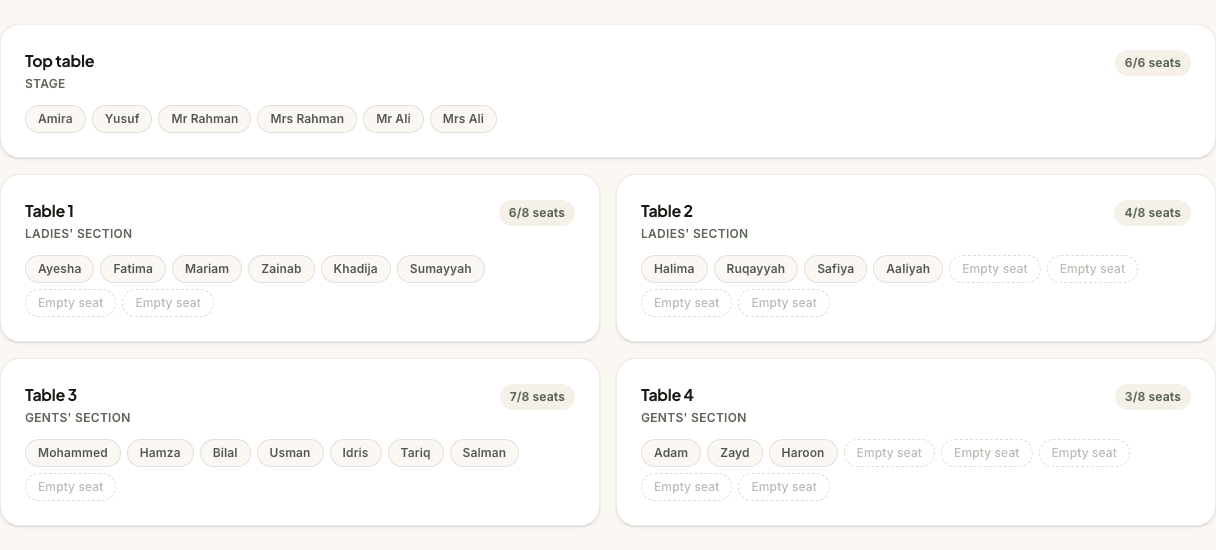
This page shows an example. Create a free account to edit and save your own.
Top table
Stage
Table 1
Ladies' section
Table 2
Ladies' section
Table 3
Gents' section
Table 4
Gents' section
What the seating plan builder does
The seating plan builder turns your confirmed guest list into a practical table layout. Create tables, rename them for the room, adjust their capacity, and choose a table for each guest from the list of people attending that event.
Each table shows how many seats are filled and how many are left, so you can see gaps and overflows before the venue asks for final numbers. Every person counts individually against a table's capacity, and anyone attending who has not been given a table stays visible in the unseated list.
The tool is built for real wedding planning rather than a static diagram. You can switch between events, keep separate plans for each one, and choose whether a particular event is mixed or segregated without rebuilding the whole layout from scratch.
Who it’s for
Couples planning a nikah, walima, barat or multi-day Muslim wedding who need a seating plan that can handle both family expectations and venue logistics. It is especially useful once RSVPs are coming in and you need to turn a guest count into actual tables.
It also helps when parents or siblings are involved in the plan. Instead of debating from memory, you can see who is seated, who is still unassigned, which tables are full and where the family tables sit in relation to the stage or entrance.
Built for Muslim weddings
Generic seating tools usually assume one reception layout and one set of social rules. Muslim weddings often need more nuance: the nikah may be smaller than the walima, some families prefer fully segregated seating, others prefer mixed family tables, and many venues need a clear split for service, entrances or prayer space.
Segregated and mixed seating for Muslim weddings
Segregated seating works best when it is planned as a hospitality choice, not just a label. Start by deciding what each event actually needs: separate men’s and women’s areas, family tables near the stage, mixed tables for close relatives, or a hybrid layout where elders and carers sit where they will be most comfortable. The builder lets you choose mixed or segregated seating per event, then tag tables as Men’s, Women’s or Family when segregation is on.
That matters because Muslim wedding seating is rarely a simple “men on one side, women on the other” exercise. You may need to keep elderly relatives close to exits, place families with children near each other, leave a clear route for the couple’s entrance, and make sure the venue team knows which tables belong to which section. The table badges give you a shared language for those conversations before the room is dressed.
The aim is not to force one interpretation of etiquette. Some nikahs are fully segregated, some walimas are mixed, and some families prefer a family section alongside separate areas. Keeping the setting on the event itself means your plan can match the values of the people in the room instead of forcing every celebration into one default.
A different layout for each event
Your nikah and walima may have completely different guest lists, table counts and room shapes. A nikah might have one family table and a few close relatives, while the walima may need dozens of tables split across two sections. The seating builder keeps each event’s layout separate, so changing the walima does not disturb the nikah plan.
When you add an event, you can decide whether it should also appear on your wedding website for invitations and RSVP selection. Confirmed guests are imported only for the event you are working on, which keeps a cousin attending the walima from accidentally appearing in the nikah ceremony seating.
Top table and family etiquette
There is no single Muslim wedding rule for the top table. Some couples sit with both sets of parents, some keep a family table for elders, and some prefer separate men’s and women’s head tables depending on the event. The safest approach is to agree the principle early, then name the table clearly so everyone understands what it represents.
Use capacity and section labels to protect the relationships that matter most: parents close to the couple, grandparents somewhere comfortable, siblings where they can help, and young children with the adults responsible for them. A good seating plan reduces awkwardness on the day because the etiquette decisions have already been made with care.
Everything you need to arrange the room
Mixed or segregated per event
Choose the seating style independently for the nikah, walima or any custom event you add.
Men’s, Women’s and Family sections
In segregated mode, table badges make the section clear for you, family helpers and the venue.
Separate event tabs
Keep one layout for the nikah, another for the walima, and more for mehndi, barat or reception events.
Connected to your guest list
Everyone attending the current event appears automatically, ready to be given a table.
Choose a table — no dragging
Pick a table for each guest or household from a list. It works the same with a mouse, keyboard, touch or screen reader.
Editable table names and capacity
Rename tables for the venue plan and adjust seats up or down while capacity counters update.
Unseated list and a clear status
See how many people are attending, seated, unseated or need review, so nobody is left off before you print.
Synced across your devices
Create a free account and your seating plan follows you from phone to laptop.
Why couples use it
Seating is where guest-list theory becomes the actual room. The builder helps you see whether the plan works before the venue coordinator, decorator or caterer asks for final table numbers. You can spot full tables, move guests around and keep unassigned names visible until every confirmed attendee has a place.
It also makes family conversations calmer. When everyone can point to a table, a section and a capacity number, the discussion moves from “where will they sit?” to a plan you can adjust together. That is especially helpful for segregated or hybrid layouts, where small choices about family tables, elders and children can make the day feel smoother for everyone.
How it works
- 1
Try the sample layout
Use the preview on this page to see tables, sections and capacity counters with sample guests.
- 2
Create your free account and choose an event
Set up a nikah, walima or custom event, then choose mixed or segregated seating for that event.
- 3
Seat your guests
Guests attending the event appear automatically. Choose a table for each one and adjust capacity as the venue plan changes.
Seating plan FAQs
Can I plan segregated seating?
Yes. Turn on segregated seating for the event you are planning, then tag each table as Men’s, Women’s or Family. You can still use mixed seating for another event, so a segregated nikah and a mixed walima can live side by side.
Can I have different plans for nikah and walima?
Yes. Each event has its own tables, guests, section setting and layout. That means you can keep a small nikah plan separate from a larger walima plan, and changes to one event do not disturb the other.
Does it pull from my guest list?
Yes. People appear in seating as soon as they are attending the event you are working on — from a personal invitation reply, a website reply you have reviewed, or a reply you record yourself. If someone later declines, their seat stays visible for you to review instead of silently disappearing.
Can I set table shapes and capacity?
You can set table names and capacity today, up to 100 seats per table. The builder currently uses flexible table cards rather than drawn floor-plan shapes, so name tables clearly — for example “Round 10”, “Long family table” or “Stage left” — when you need shape or room-position context.
Can I share the plan with the venue?
There is no venue share link. You can print or save a PDF of the plan for display — it shows names, tables and seating areas only — and export a CSV that also carries dietary and access notes for your caterer. The printout is clearly marked as a draft until every attending guest has a table and nothing needs review.
Is the seating plan builder free?
Yes. The seating plan builder is free for couples, with no card required. You can try the sample on this page first, then create a free account to save your own plan and sync it across devices.
Keep planning
Related planning tools
- Guest List · Manage RSVPs, events and dietary notes before guests are seated.
- Wedding Website · Publish your events and collect RSVPs that feed into planning.
- Wedding Checklist · Track the table-plan jobs alongside venue, decor and catering tasks.
Find your vendors
- Wedding venues · Find halls and hotels that can support your room layout and seating needs.
- Wedding decorators · Plan stages, table styling, screens and section dressing with your layout in mind.
Guides and help
- Couples FAQ · How PlanMyNikah works for couples, from planning tools to vendor enquiries.
- Planning guides · More guidance for turning your wedding plan into vendor-ready details.
Build your seating plan free
Free for couples. Your progress syncs across devices, and you can pick up where you left off any time.