Muslim Wedding Website Builder
Build a free wedding website for your nikah and walima, publish it at your own PlanMyNikah link, and let guests see the schedule, venue details and RSVP form from any device.
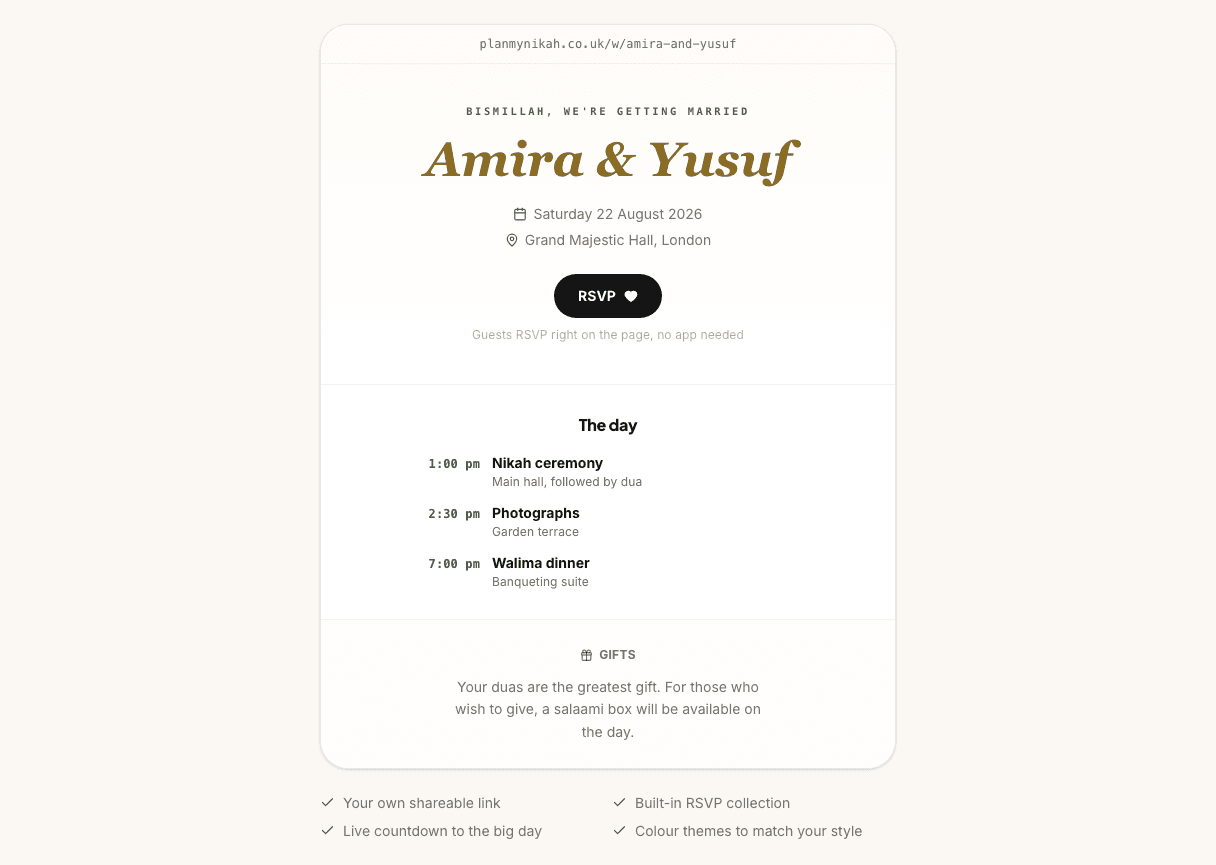
This page shows an example. Create a free account to edit and save your own.
planmynikah.co.uk/w/amira-and-yusuf
Bismillah, we're getting married
Amira & Yusuf
Guests RSVP right on the page, no app needed
The day
- 1:00 pm
Nikah ceremony
Main hall, followed by dua
- 2:30 pm
Photographs
Garden terrace
- 7:00 pm
Walima dinner
Banqueting suite
Your duas are the greatest gift. For those who wish to give, a salaami box will be available on the day.
- Your own shareable link
- Built-in RSVP collection
- Live countdown to the big day
- Colour themes to match your style
What the wedding website builder does
The wedding website builder gives your guests one simple place to check the details before they ask you directly. Add your couple names, wedding date, main venue, welcome note and public schedule, then publish everything to a link you can share by WhatsApp, email or printed invitation.
Your site can show the parts guests ask for most: nikah and walima timings, venue names, dress code, seating notes, gift or salaami guidance, your story, photo gallery and an optional Quranic ayah. Each section is editable, and you can switch sections off when they do not fit your day.
It also includes online RSVPs. Guests can accept or decline without a PlanMyNikah account, choose the events they are attending when per-event RSVP is on, and send meal or guest-side details if you ask for them. Personal replies update existing invitations; open-form website submissions need owner review before they join your Guest List and Seating plan.
Who it’s for
Couples planning a nikah, walima or full multi-event Muslim wedding who want one calm link instead of answering the same venue, timing and RSVP questions in several family chats.
It works for simple weddings too. If you are hosting a nikah and a small meal, keep the site lean with the date, masjid or venue, dress guidance and RSVP form. If you are planning mehndi, barat and walima across different days, add each event to the schedule so guests know exactly where they are expected.
Made for nikah and walima
Generic wedding website builders often assume one ceremony, one reception and one set of guests. Muslim weddings can involve several events, different family expectations and more privacy nuance. PlanMyNikah keeps those details visible without forcing your nikah, mehndi, barat and walima into a one-day structure.
Your own link
Publish at a PlanMyNikah address such as planmynikah.co.uk/w/your-names, then share that link wherever your guests already are. You can edit the slug before publishing, and if the exact address is already taken, publishing returns the final link that is safe to share.
The link is designed to behave like a digital invitation, not a search listing. It is not added to the sitemap, and the public /w/:slug route is marked noindex, follow by both the HTTP header and the page meta so search engines are told not to index it. Anyone with the link can still open a link-only site, so share it the way you would share an invitation.
RSVPs built in
The RSVP form sits directly on the wedding website, so guests do not need to install an app or create an account. They can accept or decline, enter party size, choose events, and add details such as meal choice, WhatsApp number, guest side, transport help or accessibility needs when you enable those questions.
Personal replies update the existing invitation in Guest List and Seating. Open-form website submissions and extra-guest requests appear for owner review before they join the plan. That keeps the website connected to the practical planning work that follows: catering counts, table plans and final venue lists.
Schedule, modest themes and salaami notes
Create schedule blocks for every event guests need to attend: nikah ceremony, mehndi, barat, walima, family dinner or any custom celebration. Each event can carry its own date, time, venue and note, which is useful when one event has segregated seating, another has family-only attendance, and another needs parking or prayer-space guidance.
The visual controls are built for invitation pages rather than generic landing pages. Choose font styles, colour themes, subtle Islamic-inspired motifs, background patterns, cover-photo overlays and card layouts; add a modest dress code or seating note; and write a gift or salaami message in your own words.
Everything you need to publish the invitation
A shareable PlanMyNikah link
Publish your site at a /w/your-names style address and share it with guests immediately.
Multi-event schedule
Add nikah, mehndi, barat, walima or custom events, each with its own date, time, venue and note.
Online RSVPs
Guests reply from the website, with per-event attendance, party size and optional meal or contact questions.
RSVP command centre
Review open-form submissions and extra-guest requests; personal replies update existing invitations in Guest List and Seating.
Guest information sections
Add dress code, seating, parking, travel, hotel, gift and custom notes without rebuilding the page.
Modest, flexible styling
Choose fonts, colours, motifs, backgrounds, card style and cover-photo treatment to match the feel of your day.
Privacy controls
Use link-only sharing by default, add a passcode, hide exact addresses until unlock, or make the site private.
Free for couples
The wedding website builder is free to use, with no card and no trial clock.
Why couples use it
A wedding website saves you from becoming the help desk for your own invitation. When guests can check the schedule, venue, dress code, seating notes and RSVP form in one place, fewer details get lost in family chats, and you can update the page once instead of sending the same correction to everyone.
Personal invitation replies update Guest List and Seating together. Open-form submissions need owner review before joining that journey. You can then export the reviewed guest plan for seating and catering.
How it works
- 1
Try the sample website
Use the preview on this page to see how a guest-facing nikah and walima site can look before you sign up.
- 2
Create your free account and add the details
Set your names, date, events, venue, theme, guest notes and RSVP questions inside the website builder.
- 3
Publish, share and keep editing
Publish your link, share it with guests, then return anytime to update details or publish changes.
Wedding website builder FAQs
Is it really free?
Yes. The wedding website builder is free for couples, with no card required. You can try the sample on this page, then create a free account to save and publish your own site.
Do I get my own link?
Yes. Your site publishes at a PlanMyNikah link such as planmynikah.co.uk/w/your-names. You can edit the slug before publishing, and the publisher returns the final live slug if the one you chose needs adjusting.
How do guests RSVP?
Guests open your wedding website and use the RSVP form on the page. They do not need a PlanMyNikah account. Depending on the questions you switch on, they can confirm attendance, choose events, enter party size, share meal choices, add contact details and request extra guests.
Is my website private?
By default, the site is link-only: anyone with the link can view it, but /w/:slug pages are marked noindex, follow in both the HTTP header and page meta, so search engines are told not to index them. For stricter access, you can add a passcode, hide exact addresses until guests unlock, or set the website to private so guests see only a private message.
Can I edit after publishing?
Yes. Keep editing the site after it is live, then publish changes when you are ready for guests to see them. Privacy and passcode changes also go live only after you publish, so you can review before updating the public link.
Can I use it for both nikah and walima?
Yes. Add each event separately with its own time, venue and note. You can include nikah, mehndi, barat, walima or any custom event, and per-event RSVP lets guests choose which parts they are attending.
Keep planning
Related planning tools
- RSVP Tracker · Track invitation replies and review open-form website submissions before adding people.
- Guest List · Manage RSVP status, meal notes and event attendance after guests reply.
- Seating Plan · Turn confirmed guests into table plans for the nikah, walima or any event.
- Wedding Checklist · Track the jobs that sit around publishing invitations and collecting replies.
Find your vendors
- Invitations · Coordinate printed cards, digital invitations and website links.
- Wedding decorators · Plan the stage, table styling and venue look guests will see on the day.
Guides and help
- Couples FAQ · How PlanMyNikah works for couples, from planning tools to vendor enquiries.
- Planning guides · More guidance for planning your nikah, walima and guest experience.
Build your website free
Free for couples. Your progress syncs across devices, and you can pick up where you left off any time.