Wedding Vendor Payment Tracker
Track every vendor deposit, balance and due date in one place — see what you have paid, what is still owed and which payments need attention, free and built for how Muslim weddings are actually booked.
This page shows an example. Create a free account to edit and save your own.
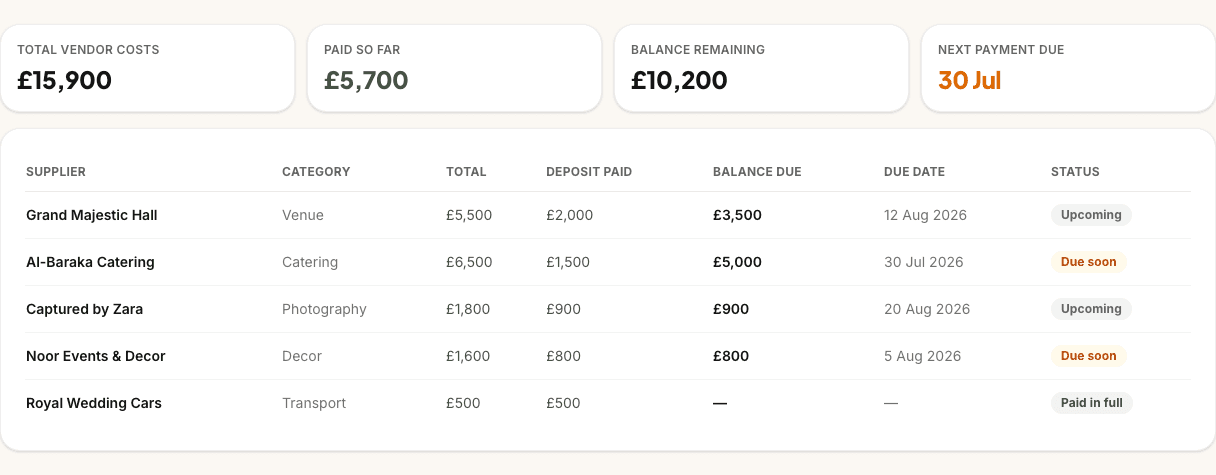
Total vendor costs
£15,900
Paid so far
£5,700
Balance remaining
£10,200
Next payment due
30 Jul
| Supplier | Category | Total | Deposit paid | Balance due | Due date | Status |
|---|---|---|---|---|---|---|
| Grand Majestic Hall | Venue | £5,500 | £2,000 | £3,500 | 12 Aug 2026 | Upcoming |
| Al-Baraka Catering | Catering | £6,500 | £1,500 | £5,000 | 30 Jul 2026 | Due soon |
| Captured by Zara | Photography | £1,800 | £900 | £900 | 20 Aug 2026 | Upcoming |
| Noor Events & Decor | Decor | £1,600 | £800 | £800 | 5 Aug 2026 | Due soon |
| Royal Wedding Cars | Transport | £500 | £500 | — | — | Paid in full |
What the payment tracker does
The payment tracker is a dedicated register for every vendor you pay. Add each vendor with their total cost, deposit, balance and due dates, then mark deposits and balances as paid as the money leaves your account — so you always know what is settled and what is still outstanding.
Four summary cards at the top show your financial picture at a glance: total budget, vendor costs committed, amount paid so far and what is still owed, plus an overdue total that surfaces when a due date has passed without payment. Each vendor row shows deposit and balance status separately, because that is how contracts are written.
Your total budget is shared with the budget planner, so the plan and the actual spending stay linked. Vendor totals only change when you add or edit a payment — marking something as paid moves money from owed to paid without rewriting your overall budget.
Who it's for
Couples planning a nikah, walima or multi-event wedding who are juggling deposits across venue, halal catering, photography, decor, mehndi, cars and more — and want one honest view instead of a folder of invoices and a notes app that never quite adds up.
It works whether you are paying for everything yourselves or coordinating with family who are covering parts of the day. Log each vendor as you book them, keep due dates accurate, and share the overdue figure when someone asks "did we pay the caterer yet?"
Built for Muslim weddings
Muslim weddings rarely involve one venue and one invoice. You might pay a masjid donation and imam fee for the nikah, a separate hall deposit for the walima, a mehndi artist in cash and a caterer on a 50% deposit schedule — all with different due dates and payment splits. The payment tracker's categories and deposit-or-balance structure match how those bookings actually work.
Deposits and balances, explained
Most UK wedding vendors take a deposit to secure the date, then the balance closer to the event — but the split varies by category. Photographers often ask for around 25% upfront; halal caterers may want 50% on booking; venues can be a fixed deposit plus a final balance weeks before the walima. The tracker records each vendor's total cost, deposit amount and remaining balance separately, with its own due date and paid toggle.
That matters because a deposit marked paid does not mean the vendor is fully settled. You can see at a glance which balances are still outstanding, even when every deposit is green. If a vendor splits payment into more than two instalments, add a separate entry for each — the tracker is built around deposit plus balance, not a generic "amount paid" field that hides what is still due.
Never miss a due date
Each deposit and balance can have its own due date. The tracker assigns a status automatically: paid when you mark it, pending when the date is still ahead, overdue when the date has passed and the payment is not marked settled, and not due when no date is set. The overdue summary card totals anything that needs attention right now — the number to check before you assume a booking is secure.
There are no email or push reminders yet; the tracker and your couple dashboard are where overdue payments surface. The practical habit is to log the deposit before you pay it, so a forgotten toggle shows up as overdue rather than disappearing from view. Keep due dates aligned with your contract — most vendors want the balance one to four weeks before the wedding, not on the day itself.
Budget and payments, connected
The budget planner is where you decide what you can afford; the payment tracker is where you record what you have actually committed and paid. Your total budget carries across both tools, so the figure you set while splitting nikah and walima costs is the same one at the top of the payment tracker. Vendor totals show how much of that budget is now tied up in real bookings.
That separation is deliberate. Adding a vendor payment does not rewrite your overall budget — it shows how much of the plan is now spoken for. When a quote comes in higher than expected, you can see the impact on vendor total and budget remaining without losing the original plan. Use the budget planner to model the split, then the payment tracker to follow the money as deposits and balances land.
Everything you need to stay on top of vendor money
Deposit and balance on every vendor
Record total cost, deposit, balance and separate due dates — matching how venue, caterer and photographer contracts are written.
Summary cards that add up
See total budget, vendor costs committed, amount paid, still owed and overdue in one row at the top.
Automatic payment status
Paid, pending, overdue and not-due labels update from your due dates and paid toggles — no manual colour-coding.
Categories for Muslim weddings
Venue, caterers, photography, mehndi, nikah fees, cars and more — pick the label that matches the vendor.
Linked to the budget planner
Your total budget is shared with the budget planner, so planned spending and vendor commitments stay aligned.
Mark deposits and balances paid
Toggle each part separately as the money leaves your account, so partial payments stay visible.
Synced across your devices
Create a free account and your payment register follows you from phone to laptop.
Free for couples
The payment tracker is free to use — no card and no trial clock.
Why couples use it
Wedding money gets stressful when the figures live in five places — a venue invoice in email, a caterer deposit on a bank statement, a photographer balance in a WhatsApp screenshot. The tracker gives you one register where every vendor, due date and paid status lives together, so "how much have we actually spent?" has a single answer.
It also makes family conversations calmer. When parents are contributing to the walima or the barat cars, you can show what is committed, what is paid and what is overdue without reconstructing the maths from memory. That is especially helpful in the final months, when balances come due across several vendors at once.
How it works
- 1
Try it, then create your free account
Explore the sample payments on this page first — sign up free when you want to save your own vendors.
- 2
Add vendors as you book them
Log each vendor with their total, deposit, balance and due dates — use the categories that match your nikah, walima and side events.
- 3
Mark payments and watch overdue
Toggle deposits and balances as you pay them, keep due dates honest, and check the summary cards when balances start landing.
Payment tracker FAQs
How is this different from the budget planner?
The budget planner is for planning what you intend to spend — splitting your total across categories and events before quotes arrive. The payment tracker is for tracking what you have actually committed and paid to real vendors, with deposits, balances and due dates. They share your total budget, but vendor payments never overwrite the plan itself.
Are there due-date reminders?
Not by email or push notification yet. Each payment gets an automatic status from its due date and whether you have marked it paid, and overdue amounts roll up into the summary card and your dashboard. The tracker is designed so logging a payment before you pay it, then marking it paid when the money goes out, keeps overdue visible if something slips.
Can I record multiple payments per vendor?
Each vendor entry supports one deposit and one balance, with separate due dates and paid toggles. If a vendor splits payment into three or more instalments, add a separate entry for each instalment so every due date and amount stays visible.
What currency does it use?
All amounts are in pounds sterling (GBP, £). The tracker is built for UK Muslim weddings, where vendor quotes and contracts are quoted in GBP.
Is the payment tracker really free?
Yes. The payment tracker is free for couples, with no card required. You can try it on this page with sample data, and creating a free account lets you save your vendors and sync across devices.
Does it connect to my budget?
Yes. The total budget you set is shared with the budget planner — the same figure appears at the top of both tools. Vendor totals in the payment tracker show how much of that budget is now committed to real bookings, without changing the budget number itself.
Keep planning
Related planning tools
- Budget Planner · Set your total and split costs across nikah, walima and every event before you log payments.
- Wedding Checklist · Track booking tasks alongside the deposits you are logging here.
- Guest List · Guest counts that drive catering quotes — and the deposits that follow.
Find your vendors
- Wedding venues · Halls and hotels for nikah and walima — usually the first big deposit.
- Halal caterers · Per-head walima menus with deposit schedules that need tracking.
Guides and help
- Couples FAQ · How PlanMyNikah works for couples, including budget and payment tracking.
- Planning guides · Step-by-step guides to every free planning tool.
Track your payments free
Free for couples. Your progress syncs across devices, and you can pick up where you left off any time.